
Field Notes · AI and the trades · 2026-07-23
By Samad S. (Founder)
Field-service software, scored honestly (including ours)
The short answer: Scored on five things that matter to a 1–5 technician shop: offline resilience, data ownership, AI posture, pricing clarity and switching cost. The enterprise platforms win on capability and lose on cost and lock-in. The mid-market tools are polished generalists. JobCard, ours, leads on offline and ownership and is the newest and least proven here. Posture assessment as of July 2026, not a hands-on test.
Most software comparisons in this trade are written by whoever is selling, or by affiliate sites paid per signup. This one is written by a vendor too — so read it with that in mind, and note that we have scored ourselves with the same ruler and named where we lose.
Verified: July 2026. Vendors change pricing and features quietly. Check the current state yourself before any decision; if something here is out of date, it is a mistake rather than a tactic, and we would like to know.
How this was scored, and what it is not
Scores run 1–5 per criterion, drawn from public documentation, pricing pages and community reports. This is a posture assessment, not a lab test. We have not run twelve months of live service work through each platform, and anyone claiming they have in a blog post probably has not either.
What that means practically: treat these as a map of where each tool's priorities lie, not as a measurement of quality. A 2 for offline does not mean the software is bad. It means the product was designed on the assumption that coverage exists.
The five criteria
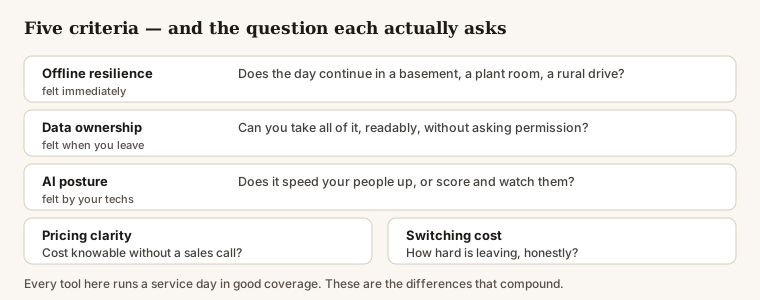
Offline resilience — does the day continue in a dead zone? Not "does it cache a page", but can a tech open the job, read the equipment history, write notes, and close it out in a plant room with no bars.
Data ownership — can you take everything, readably, at any time, without asking permission? Photos and signatures included, not just contacts.
AI posture — does the AI serve your people or watch them? Scheduling help and faster paperwork sit at one end; technician scoring and surveillance sit at the other.
Pricing clarity — can you know what it costs without a sales call?
Switching cost — how hard is leaving, honestly, including the parts that are cultural rather than technical?
The scores
| Offline | Ownership | AI posture | Pricing | Switching | Best for | |
|---|---|---|---|---|---|---|
| ServiceTitan | 2 | 3 | 3 | 1 | 2 | 20+ technicians, dedicated ops staff |
| Housecall Pro | 2 | 3 | 3 | 3 | 3 | Growing shops wanting one polished tool |
| Jobber | 2 | 3 | 3 | 4 | 3 | Small shops who want simple and fair |
| Workiz | 2 | 2 | 3 | 4 | 3 | Price-sensitive shops, check the export terms |
| JobCard (ours) | 4 | 5 | 4 | 4 | 5 | 1–15 technicians with bad coverage and a long memory |
Higher is better. Switching is scored as ease of leaving, so 5 means easy.
What the numbers mean, tool by tool
ServiceTitan — the enterprise standard. Enormous capability, and an enormous platform to operate it. Priced per technician with real sales friction, and the operating model assumes people whose job is running the system. If you have five technicians you are their smallest acceptable customer rather than their priority, and you will feel that in support and in the implementation.
Housecall Pro — the polished generalist. The best-rounded of the mid-market tools: strong scheduling, payments and marketing automation, with per-user pricing you can actually read. Cloud-first by design, so offline is a fallback rather than a foundation. Its AI work leans toward automating customer contact rather than speeding up the person holding the tools.
Jobber — the small-shop favourite. Simple, fair pricing and a clean product that smaller shops genuinely like, which is not a small thing — most of this category is disliked by the people made to use it. Same cloud-first shape: your day depends on coverage, and your history sits behind an export process rather than in your hands.
Workiz — the value tier. Competitive headline pricing and an aggressive feature checklist. Read the fine print on what export actually produces before you build years of history on it; that is where the ownership score comes from.
JobCard — ours. Built offline-first, so the day continues without signal and syncs in order when it returns. After the first setup the whole app is stored on the device, including through an update. Everything exports in a form you can verify yourself, and deletion destroys the key rather than hiding the row. AI is used for speed with a person required on every external action.
Why offline is a 4 and not a 5. It is a browser-based app, and that carries two limits worth stating before you rely on it. First use needs a connection — set it up on wifi before the first job, because no web app can load itself in a dead zone. And browsers can clear their own storage: Safari does so after roughly a week of not opening a site, and a technician who clears their browser data will wipe the local copy. Work already synced is safe on the server and exportable; anything written offline and not yet synced is not. We ask the browser to keep our storage, and installing to the home screen makes that much more likely, but no web app can make eviction impossible. Anyone scoring themselves 5 on offline in a browser is either not counting this or not telling you.
The honest weaknesses, since we are scoring ourselves: it is the newest product here by a wide margin. The feature surface is narrower than anything else on this list. Integrations are the thinnest. It is unproven at scale because it has not been at scale. AI posture is a 4 rather than a 5 because there is no AI receptionist and no photo diagnosis — deliberate, but a gap either way if you want those things.
Do not take our word for the data claims. The export format and the verifier are public, so that is the one part of this table you can check yourself without trusting anybody.
Why offline keeps scoring low everywhere else
It is worth saying plainly that a 2 for offline is not laziness. It is a reasonable engineering decision that has aged badly for this trade.
Building software that works properly without a connection is substantially harder than building software that assumes one. You have to decide what happens when two people change the same job on different devices, hold a queue that survives the app closing, and show the user honestly what has and has not been saved. Most tools built in the last decade assumed connectivity because, in an office, that assumption holds.
Field service is not an office. Basements, plant rooms, rooftops with equipment between you and the mast, rural drives, new-build sites with no service yet — this is where the work happens, and it is the one condition under which most of this category degrades.
The pattern, not the verdict
Every tool above will run a service day in good coverage. If that is your situation, pick on features and price and you will be fine — and Jobber and Housecall Pro are genuinely good products with years of refinement we do not have.
The differences that compound over years are narrower than the feature lists suggest:
- What happens in a dead zone, because that is where your worst days are.
- Who can read your history tomorrow, because you will want it during a dispute, a sale, or an insurance claim.
- How leaving feels, because you will eventually want to, from whatever you pick today.
Choose on those three and you will rarely choose badly — including if you do not choose us.
Read next
- The actual threats: consolidation, data extraction, and surveillance-by-default — AI and the trades
- The mitigation playbook: six moves that work for a 1–5 technician shop — AI and the trades
- What to automate first, and what to leave alone — Running the business
Get the Field Notes by email
One useful post when it's written — dispatch, quoting, getting paid, and straight talk on AI in the trades. Nothing else, no selling your address, and you leave with one click.
Try it on a real day
JobCard is free while we build it with working HVAC shops. Bring one real service day and see whether it holds up — export everything whenever you want.