
Field Notes · Building JobCard · 2026-07-23
By Samad S. (Founder)
Switching software without losing your history
The short answer: The real cost of switching field-service software is your history: customers, equipment, what was done last visit, what is still owed. A safe migration is staged and previewed — every row shown with a plain verdict before anything is written — and reversible right up until money is involved. Often the better answer is not to migrate at all.
Ask an owner why they are still on software they complain about weekly and the answer is almost never the price. It is that eleven years of customer history lives in it, and moving that history feels like a coin flip they cannot afford to lose.
They are right to be wary. Most of what this industry calls migration is a paste box and a prayer.
What you are actually moving
Not a customer list. A spreadsheet of names and phone numbers is the easy part, and it is the part every vendor will happily import for you.
The history that matters is the rest of it: which unit is on that wall and when it went in, what the last tech found and what they flagged for next time, what was quoted against what was charged, who signed for the work, what is still outstanding. That is the material you need in a dispute, at a sale, or simply to walk into a callback already knowing something.
Lose that and you have not changed software. You have started again.
The failures that make owners wary
They are consistent, and none of them announce themselves:
- Silent duplicates. The same customer arrives twice under slightly different spellings, and you find out when two techs are dispatched to one address.
- Dates landing wrong. A US-format importer reading an ISO date usually succeeds and produces the wrong day — worse than a rejection, because nothing surfaces until a job is booked for the wrong week.
- Partial imports that report success. Contacts and invoices travel; photos, signatures and job notes stay behind. Exactly the parts that matter later.
- No way back. Something is wrong on day three and the only remedy on offer is to delete everything and start again.
Each of these is a design choice rather than bad luck. They happen because the import was built to finish, not to be checked.
What a safe migration looks like
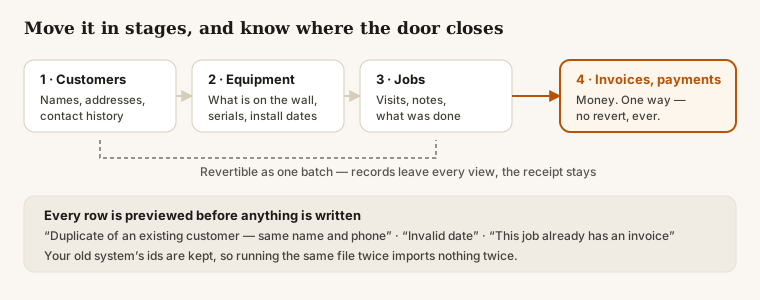
Staged, in dependency order. Customers, then equipment, then jobs, then money. Each stage stands on the one before, so a problem surfaces while it is still cheap to fix.
Previewed, with a verdict per row. Before anything is written you see every row and what will happen to it, in plain words rather than error codes: duplicate of an existing customer — same name and phone, invalid date, this job already has an invoice. Nothing imports blind.
Idempotent. Your old system's record ids are kept on everything that lands. Run the same file twice and the second run reports already migrated instead of doubling your customer list. That matters more than it sounds — almost every real migration gets run more than once.
Reversible, up to a point. A batch containing only customers, equipment and jobs can be reverted as one thing. The records leave every view, and the audit trail keeps the receipt that they were there and were removed.
Where reversibility honestly stops
A batch that created invoices or payments cannot be reverted.
We could build a button that hides them. We will not, because money history is not something to roll back quietly — an invoice that existed, existed, and a tool that can make financial records disappear on request is a tool nobody should trust with financial records in the first place.
So the money stage comes last, deliberately, after the shape of everything else has been proven against your real data. By the time you reach the point of no return, you have already seen the parts that can still go back.
Any vendor should be able to tell you exactly where their point of no return sits. If they cannot, the honest reading is that there is no revert at all.
The better answer: you may not need to migrate
Here is the part most vendors will not say, because it delays their invoice.
A migration is a bet placed before you have evidence. You move eleven years of history into a product you have used for a fortnight, on the strength of a demo.
The alternative is to move nothing yet. Keep your existing system running exactly as it is, and run the new one beside it on the jobs that annoy you most — the dead-zone calls, the ones where paperwork gets retyped at nine at night. Only new work goes into the new tool. Your history stays where it is, untouched and unrisked.
If it holds up across a real season, the migration becomes a decision you make with evidence instead of hope. If it does not, you close the tab and nothing has happened to your business.
That is why JobCard exports what you have entered in the shape your existing system imports, and why we would rather you ran us alongside something else for a few months than moved everything on day one. A tool that expects to be kept does not need to make leaving expensive.
What to ask, whoever you are evaluating
- Can I see every row and what will happen to it, before anything writes?
- What happens if I run the same import twice?
- What exactly can be reverted, and where does that stop?
- What does not come across at all? Photos, signatures, notes and timestamps are the usual answers, and they are the ones that matter.
- Can I run you alongside what I have, instead of switching?
A vendor who answers all five specifically is one you can plan around. One who answers with reassurance has told you something too.
Read next
- What "your data is yours" means in practice — Building JobCard
- What AI actually does in field service today — reality vs the sales pitch — AI and the trades
- What HVAC techs actually fear about AI — named honestly — AI and the trades
Get the Field Notes by email
One useful post when it's written — dispatch, quoting, getting paid, and straight talk on AI in the trades. Nothing else, no selling your address, and you leave with one click.
Try it on a real day
JobCard is free while we build it with working HVAC shops. Bring one real service day and see whether it holds up — export everything whenever you want.