
Field Notes · Building JobCard · 2026-07-23
By Samad S. (Founder)
What "your data is yours" means in practice
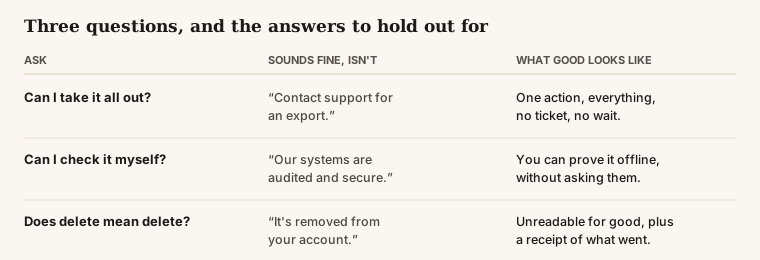
The short answer: Every vendor says your data is yours. Three questions separate the ones who mean it: can you take everything out right now without asking permission, can you check the history is unaltered without trusting the vendor, and does deleting actually destroy it. Most software passes the first, few pass the second, and almost none pass the third.
Ask any software company whether your data belongs to you and the answer is yes. It is on the pricing page, in the sales call, and in the terms nobody reads. The word does almost no work.
What separates the companies that mean it from the ones that say it is not intent. It is whether the thing is built so that leaving is easy — because a company that finds your leaving expensive will, over years, make it harder, and it will do so gradually enough that nobody ever has to decide to be dishonest.
Can you take everything out, right now, without asking?
The first question is the easiest to test and the most commonly failed in spirit rather than in letter.
Almost every tool has an export. The question is what it contains and what it costs you to get. A spreadsheet of customer names and addresses is not your business history. Your history is the jobs, when they were scheduled and when they actually happened, what was quoted and what was charged, who did the work, what parts went on, what the customer signed, and the photos that prove the condition of the unit before you touched it.
Watch for the softer failures, which are far more common than a flat refusal:
- The support ticket. An export you must request is an export somebody can slow down. It also means you cannot leave on a bad Friday.
- The partial export. Contacts and invoices travel; photos, signatures, job notes and timestamps stay behind. Those are exactly the parts that matter in a dispute.
- The unusable format. A PDF of your records is not your records. If you cannot load it into something else, you have a souvenir.
- The clock. Exports available for thirty days after cancellation are a countdown, and you will be running it during the worst possible week.
In JobCard, one action produces the whole history — customers, jobs, quotes, invoices, payments, costs, photos — with no ticket and no waiting. That is not generosity. It is the only version of the claim that survives contact with a shop owner who has been burned before.
Can you check it yourself, without trusting the vendor?
This is the question almost nobody asks, and it is the one that separates a promise from a property.
Suppose you export everything. How do you know it is complete? How do you know a record was not quietly edited eighteen months ago? Ordinarily you cannot — you take the vendor's word, backed by an assurance about audits and security. That assurance may be entirely sincere. It is still just a claim, and you have no way to test it.
There is a stronger version. Each entry can be sealed to the one before it, so that changing anything in the middle of the history breaks every seal after it. You do not have to trust anybody's word about that. You run a check, and it either matches or it does not.
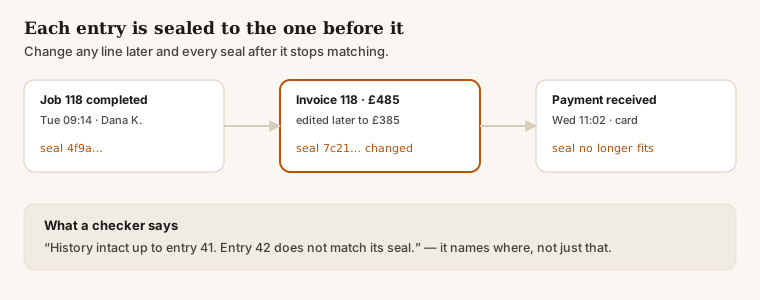
The important part is who can run that check. In JobCard the export carries its own verifier, so an accountant, an insurer, a buyer doing diligence, or you on a laptop with no signal can confirm the history is complete and unaltered without asking us anything at all. We could refuse to cooperate and it would still work.
The honest limit: this proves the history has not been altered since it was recorded. It cannot prove that what was recorded was true in the first place. If a tech marks a job complete before leaving the driveway, the chain faithfully preserves that. Sealing protects a record from tampering, not from an honest mistake or a dishonest technician.
Very few tools in this market offer verification today. Ask for it anyway. Asking is what turns a rarity into an expectation.
Does deleting actually delete?
The third question is where the gap between the ordinary answer and a good one is widest.
"Deleted" usually means removed from your view. The row may be flagged rather than removed, the record may sit in backups indefinitely, and copies may live in analytics systems and third-party tools nobody has enumerated. None of this is necessarily sinister. It is what happens when deletion is treated as a feature rather than as a design constraint.
In JobCard, erasing a customer destroys the encryption key their records were protected with. The records do not become hidden. They become permanently unreadable, including in copies we hold. The system then issues a receipt stating what was destroyed and how far the erasure reached.
The honest edges, which the receipt states out loud rather than burying:
- A backup taken yesterday still holds unreadable data until that backup expires on its own schedule. It cannot be read, but it exists.
- Anything you exported before the erasure is yours and beyond our reach. We cannot delete a file that is on your laptop.
- Records the law requires you to retain are retained, and the receipt names them rather than pretending otherwise.
A vendor who hands you a receipt with edges on it is more trustworthy than one who hands you a clean confirmation — because the clean confirmation is usually the one nobody examined carefully.
Why we built it this way
There is a straightforward commercial argument against everything above. Software that is hard to leave keeps customers who would otherwise go. Every lock-in mechanism in this industry exists because it works.
We took the other side of it for a plain reason. Software that is hard to leave gets left the moment something clearly better appears, and it gets left with resentment attached — the owner tells everyone at the supply house why. Software that is easy to leave has to be worth staying with every month, which puts the pressure on us to keep earning it rather than on you to keep tolerating it.
That is a bet, not a virtue. We would rather compete on whether the product is good than on how expensive we can make your exit.
What to do with this
You do not need to switch anything to use any of it. Take the three questions to whatever you run today and ask them plainly:
- Can I export everything myself, right now, without a support ticket?
- Can I verify that history is complete and unaltered without your help?
- When I delete something, what exactly happens to it — and what remains?
A good vendor answers all three with a mechanism. A vendor who answers with reassurance has told you something useful too.
If the answers are worse than you expected, that is worth knowing whoever you end up using — including if it is not us.
Read next
- Switching software without losing your history — Building JobCard
- What HVAC techs actually fear about AI — named honestly — AI and the trades
- Callbacks: what they really cost, and how to count them — Running the business
Get the Field Notes by email
One useful post when it's written — dispatch, quoting, getting paid, and straight talk on AI in the trades. Nothing else, no selling your address, and you leave with one click.
Try it on a real day
JobCard is free while we build it with working HVAC shops. Bring one real service day and see whether it holds up — export everything whenever you want.